Getting Field Workers to Actually Use Time Tracking Systems: What Works
Time tracking technology fails in construction for one simple reason: field workers won’t use it. Contractors invest thousands in software licenses, hardware deployments, and training programs, only to watch adoption rates collapse within weeks. The problem isn’t worker resistance to accountability. The problem is systems designed by people who’ve never spent a day in boots […] The post Getting Field Workers to Actually Use Time Tracking Systems: What Works appeared first on World Construction Today.
 machineryasia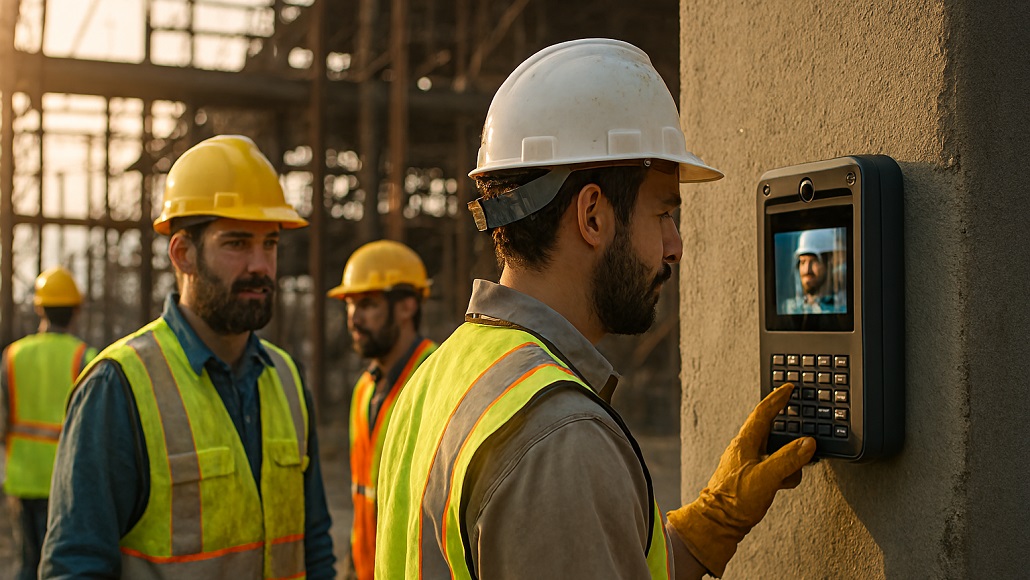
Time tracking technology fails in construction for one simple reason: field workers won’t use it. Contractors invest thousands in software licenses, hardware deployments, and training programs, only to watch adoption rates collapse within weeks. The problem isn’t worker resistance to accountability. The problem is systems designed by people who’ve never spent a day in boots on a jobsite.
Field adoption determines whether time tracking delivers value or becomes another abandoned technology initiative. When workers consistently check in and out, contractors gain accurate labor data that feeds payroll, job costing, and project analytics. When they don’t, the entire system breaks down – forcing foremen back to paper timesheets and manual data entry that defeats the original investment.
Why Field Workers Abandon Time Tracking Systems
Most construction technology deployments ignore the realities of field work. Office teams select platforms based on features lists and integration capabilities without considering how those systems function in actual construction environments. The disconnect manifests immediately when equipment reaches jobsites.
Workers arrive wearing gloves that won’t work with touchscreens. Phones stay dead because there’s nowhere to charge them overnight. Apps require internet connectivity that doesn’t exist in basements or steel-framed structures. Fingerprint scanners fail when hands are covered in concrete dust or when welders have burned off their prints. Every excuse reinforces the perception that technology doesn’t work for construction.
The adoption problem compounds when systems require multiple steps to complete simple tasks. Workers standing in line at a tablet-based time clock waste productive minutes each morning and afternoon. Apps demanding separate logins for different projects create confusion across multi-site crews. Platforms requiring workers to remember cost codes or select from dropdown menus introduce friction that paper timesheets never had.
According to AGC workforce research from 2023, 68% of construction firms report that job candidates lack the basic skills needed to work in the industry. Expecting these same workers to navigate complex technology platforms without extensive training sets deployments up for failure.
The Excuse-Free System Requirements
Successful time tracking adoption starts with eliminating every valid excuse workers have for not using the system. This requires understanding field conditions from the worker’s perspective, not the project manager’s office.
Zero Device Dependency
Workers shouldn’t need smartphones to clock in. Phone ownership, battery life, screen damage, and personal device policies all create barriers. Requiring workers to download apps on personal phones introduces privacy concerns and data plan costs that many resist. Company-provided devices solve one problem but create others – distribution logistics, lost equipment, and the need to collect devices from terminated workers.
Hardware-based solutions deployed directly on jobsites eliminate device dependency entirely. Workers approach a mounted time clock, identify themselves, and check in without needing to carry anything. The system works whether workers have smartphones or not, whether phones are charged or not, whether they’re wearing gloves or not.
Connectivity That Works Everywhere
WiFi doesn’t exist on most active construction sites. Cellular service penetrates poorly inside steel structures, below grade, or in remote locations. Time tracking systems that depend on workers’ internet connections fail in exactly the conditions where construction happens.
Built-in cellular connectivity solves this constraint. When time clocks have their own LTE connections independent of site infrastructure, data flows regardless of jobsite conditions. Workers check in from basements, high-rises, remote locations, and steel-framed buildings without connectivity becoming an excuse.
Verification Without Friction
Buddy punching remains a persistent problem across the industry. Workers clock in for colleagues who are late or absent, creating fraudulent payroll entries that contractors can’t detect until reviewing time data weeks later. Traditional solutions – fingerprint scanners, RFID badges, PIN codes – each have limitations that reduce effectiveness.
Biometric facial verification provides accountability without introducing new friction. Workers simply look at a camera during check-in. The system compares the current photo to previous images and verifies identity automatically. No pre-enrollment photoshoot is required. No physical tokens to lose or share. The verification happens in seconds without workers needing to remove gloves, clean hands, or remember passwords.
Implementation Strategies That Drive Adoption
Technology selection matters, but deployment execution determines whether workers actually adopt the system. Contractors who achieve 95%+ adoption rates within the first week follow consistent patterns.
Start With Pilot Projects
Full fleet deployments without testing create massive risk. A single overlooked constraint – power availability, mounting locations, crew schedules – can derail enterprise rollouts costing hundreds of thousands of dollars. Pilot projects on representative jobsites expose problems before they become disasters.
Select pilot sites that reflect typical operations rather than ideal conditions. Include projects with poor connectivity, large crews, multiple shifts, and temp labor. Test the system under real field conditions for at least two weeks before expanding. Collect feedback from foremen and workers, not just project managers.
When evaluating best construction time tracking solutions, prioritize platforms that support phased rollouts with clear success metrics at each stage. Solutions designed for immediate enterprise deployment often lack the flexibility needed to adapt based on pilot learnings.
Make It Simpler Than Paper
The benchmark for adoption is paper timesheets. If the new system requires more time or effort than clipboard-based time cards, workers will resist. Successful implementations reduce the complexity of time tracking rather than just digitizing existing processes.
Workers should complete check-in in under 30 seconds. No logins. No password recovery. No selecting from dropdown menus. Type a phone number, take a picture, done. The system handles everything else – lunch deductions, rounding rules, overtime calculations – without worker intervention.
Foremen benefit from pre-populated timesheets instead of blank forms. Rather than creating time entries from memory, they review verified check-in/check-out data and assign cost codes. The workflow shifts from data entry to data approval, cutting timesheet processing time by 80% or more.
Position It as Worker Protection
Frame time tracking as accountability that protects workers, not just management oversight. Workers who consistently arrive early and stay late want credit for those hours. Honest workers resent colleagues who falsify time cards or engage in buddy punching without consequences.
Systems that verify actual arrival and departure times create fairness. Workers can’t lose credit for hours worked because foremen forget or make transcription errors. Disputes over time become rare because verified data withstands challenges from both workers and contractors.
According to Construction Industry Institute research on project execution, successful implementations of new processes require clear communication about benefits to all stakeholders, not just management. Workers adopt systems that demonstrably improve their own experience.
Training That Actually Works
Most technology training programs fail in construction because they’re designed for office workers, not field crews. Hour-long sessions covering every feature create information overload. Comprehensive manuals nobody reads waste training budget. Complex certification requirements that workers must complete before accessing systems guarantee non-compliance.
Field workers need three pieces of information: where the equipment is, how to use it, and what happens if they don’t. Effective training delivers these answers in under five minutes.
On-Site Demonstration
Schedule training at shift start when crews are gathered. Show the time clock. Demonstrate check-in once. Have every worker complete their first check-in while trainers are present. The entire session takes less time than a typical toolbox talk.
Skip the PowerPoint. Don’t discuss integration capabilities or reporting dashboards. Workers don’t need to understand back-end system architecture. They need to know: type your phone number, look at the camera, you’re checked in.
Foreman-Specific Training
Foremen require deeper training on timesheet review, cost code assignment, and exception handling. This training happens separately from worker training and focuses on workflows rather than system navigation.
Show foremen pre-populated timesheets. Demonstrate one-click cost code assignment. Cover common scenarios: worker forgot to check out, split time across multiple activities, handle early departures. Keep it practical and scenario-based rather than feature-focused.
Research from McKinsey on construction technology adoption emphasizes that successful implementations focus training on operational changes rather than technical capabilities. Workers need to understand how their daily routines change, not how the software works.
Continuous Support
The first week determines long-term adoption. Station someone on-site during shift changes to assist workers who have questions. Respond to foreman inquiries within hours, not days. Address equipment issues immediately rather than waiting for scheduled maintenance.
Workers form opinions about new systems quickly. If the time clock isn’t working on day three, they conclude it never works and revert to paper. If check-in takes two minutes because nobody’s there to help troubleshoot, they’ll avoid it. Aggressive early support prevents these negative first impressions.
Overcoming Common Resistance Patterns
Even well-designed systems face adoption challenges from workers accustomed to existing processes. Resistance rarely stems from technology aversion. It stems from perceived threats to established workflows, concerns about accountability, or simple change fatigue.
Address the “Big Brother” Concern
Workers sometimes view time tracking as excessive surveillance. This perception grows when contractors deploy systems without explanation or frame implementation as catching fraud rather than improving operations.
Transparent communication neutralizes this concern. Explain why accurate time tracking matters: payroll accuracy, T&M billing documentation, labor cost management. Emphasize that the system creates accountability for everyone – workers get credit for actual hours, contractors get reliable data, foremen spend less time on timesheets.
Position facial verification as protection against identity theft rather than surveillance. Workers can’t be clocked in by someone else. Their time records can’t be altered by foremen playing favorites. The system creates a verified record that protects their interests.
Handle the “I Forgot” Excuse
Workers will miss check-ins or check-outs, especially during the first weeks. Systems that penalize these errors create resentment. Systems that make corrections easy encourage compliance.
Enable foremen to add missed punches with required comments. Flag patterns of repeated misses without blocking payroll. Send automated reminders via text when workers forget to check out. The goal is consistent behavior over time, not perfect compliance from day one.
Manage Union Considerations
Union environments introduce additional adoption considerations. Union agreements may specify timekeeping procedures. Shop stewards may need to approve new systems. Workers may view management-initiated technology with suspicion based on past experiences.
Involve union leadership early in the selection and deployment process. Demonstrate how the system benefits workers through accurate time capture and reduced disputes. Allow union representatives to participate in pilot testing. Their endorsement carries more weight than management directives.
Measuring and Maintaining Adoption
Deployment doesn’t end when equipment goes live. Sustained adoption requires ongoing monitoring and intervention when compliance drops.
Track completion rates daily during the first month. Set clear thresholds: 95% of workers check in, 90% check out without foreman intervention, 85% have cost codes assigned within 24 hours. When metrics fall below these targets, investigate immediately.
Common causes of adoption degradation include: equipment failures that aren’t reported, foremen reverting to manual entry to “save time,” workers who were absent during initial training, new hires who never received training, and project changes that invalidate original workflows.
Schedule monthly reviews with project managers to assess system performance. Collect feedback on what’s working and what’s creating friction. Use this input to refine processes and address emerging issues before they become adoption barriers.
According to PMI research on executive sponsorship, projects with actively engaged executive sponsors show significantly higher success rates. The same principle applies to time tracking adoption – ongoing leadership attention signals that this change is permanent, not experimental.
The Long-Term Adoption Challenge
Initial deployment success doesn’t guarantee sustained compliance. Workers will test whether the system is actually required or just suggested. Foremen will evaluate whether reverting to old methods carries consequences. Project managers will assess whether leadership truly supports the change.
Consistent enforcement matters more than aggressive rollout. When exceptions are tolerated – allowing certain crews to skip check-in, permitting project managers to use alternate systems, accepting manual timesheets “just this once” – workers conclude the new system is optional.
Make non-compliance unacceptable from the start. Workers who consistently refuse to check in face progressive discipline. Projects that don’t use the system don’t get approved. Foremen who bypass the system receive direct feedback from operations leadership. This consistency transforms behavior faster than any training program.
The contractors who achieve lasting adoption treat time tracking as fundamental operational infrastructure, not optional technology. When accurate time data becomes the foundation for payroll, job costing, and project management, workers understand the system isn’t disappearing. Their behavior adjusts accordingly.
Field adoption determines whether time tracking delivers ROI or becomes another failed technology initiative. The contractors who achieve 95%+ adoption rates within weeks follow consistent patterns: deploy excuse-free systems that work in field conditions, train workers in minutes rather than hours, position the system as protection rather than surveillance, and enforce compliance consistently from day one. These operational choices matter more than feature lists or vendor selection.
The post Getting Field Workers to Actually Use Time Tracking Systems: What Works appeared first on World Construction Today.